


Google Ads is auto-upgrading Search campaigns to AI Max. Learn what AI Max for Search campaigns does, how it differs from PMax and what to audit now.
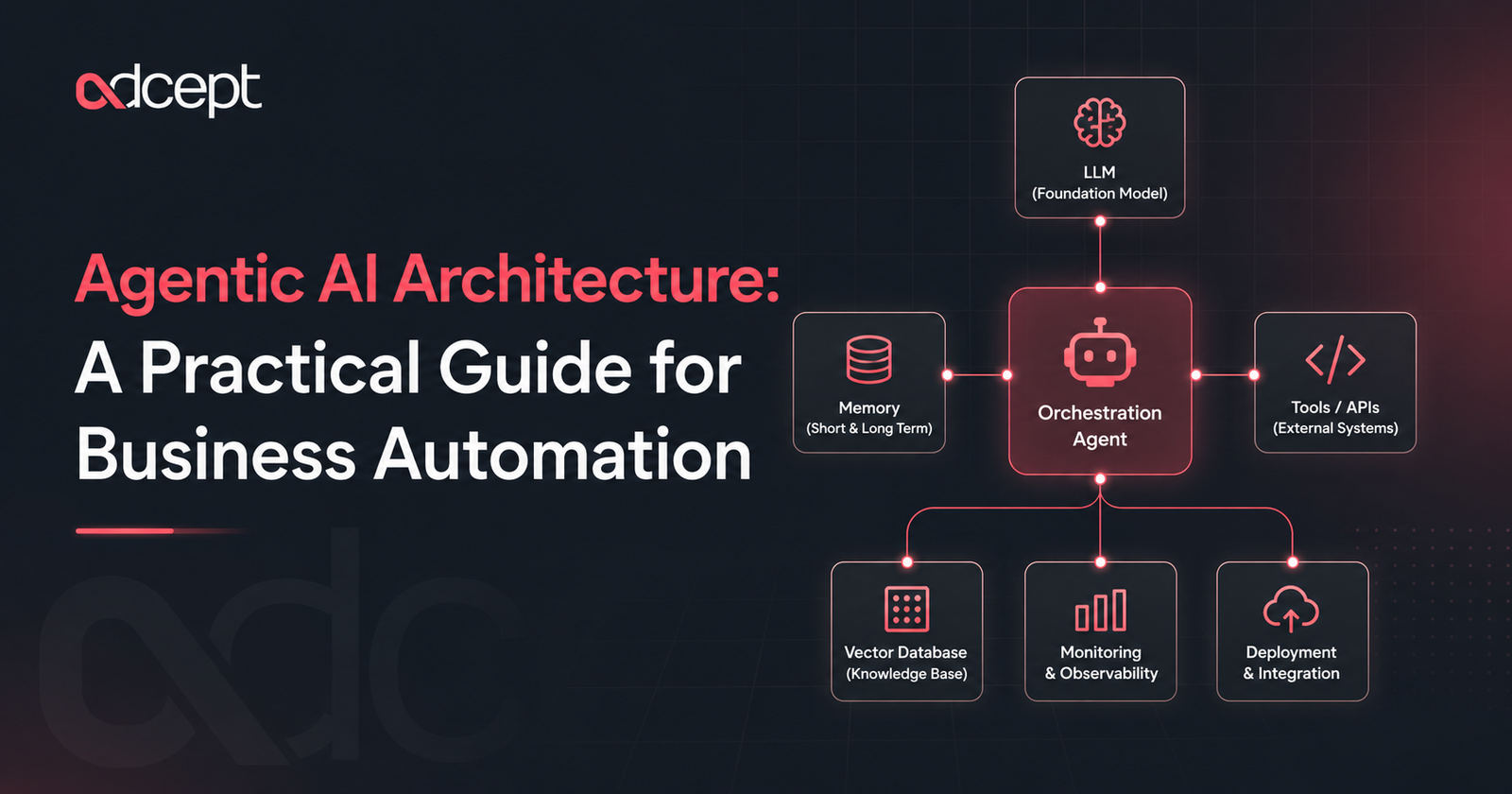
Agentic AI architecture is the technical structure that allows AI agents to plan, decide, use tools and complete tasks across business systems. It combines large language models, orchestration layers, APIs, memory, vector databases, and monitoring and deployment controls into a single working system.
This article is part of a wider agentic AI content cluster. For a broader introduction, you can read Adcept’s pillar guide on what agentic AI is.
Here, we will focus on how the architecture works behind the scenes.
What Is Agentic AI Architecture?
Agentic AI architecture is the design of an AI system that can understand goals, plan actions, call tools, retrieve knowledge, remember context and complete tasks with limited human input.
Google describes AI agents as systems built around models, grounding, tools, data architecture, orchestration and runtime. These parts help agents reason, retrieve knowledge, perform actions and run at scale.
In simple terms, the architecture is what turns an AI model into a working digital agent.
A chatbot may answer a question.
An AI agent can check a CRM, read a customer record, draft a response, update a deal stage and notify a sales manager.
That requires more than a prompt.
It requires a connected system.
Agentic AI Architecture in Simple Terms
Agentic AI architecture is the set of building blocks that allows an AI agent to move from “thinking” to “doing”. It includes the model, memory, tools, APIs, workflow logic, monitoring and deployment environment.
The model provides reasoning.
The tools provide action.
The orchestration layer connects everything.
Why Agentic AI Architecture Matters
Agentic AI architecture matters because business automation often involves judgement, context and multiple systems. A strong architecture helps AI agents act safely, use the right data and complete work in a controlled way.
Without good architecture, an AI agent may:
- Use the wrong data
- Take the wrong action
- Lose context
- Repeat steps
- Fail silently
- Expose sensitive information
- Become hard to monitor
This is why agentic AI is not just an AI writing tool.
It is a business system.
For companies exploring AI Agent Development, the architecture should be planned before tools are selected. Adcept’s AI Automation service focuses on AI agents, workflow automation, CRM integration and reducing manual work across business systems.
Core Components of Agentic AI Architecture
A practical agentic AI architecture has several layers. Each layer plays a clear role in how the agent understands, decides and acts.
1. Large Language Model Layer
The large language model, or LLM, is the reasoning engine.
It interprets instructions, understands language, reviews context and decides what action may be needed.
Common examples include:
- OpenAI models
- Anthropic Claude
- Google Gemini
- Meta Llama
- Mistral models
- Azure OpenAI models
The LLM should not be treated as the whole system.
It is one part of the architecture.
The rest of the system controls what the model can access, what it can do and how results are checked.
2. Orchestration Layer
The orchestration layer controls the flow of work.
It tells the agent what step comes next, which tools to use and when to stop.
Microsoft describes AI agent orchestration patterns such as sequential, concurrent, handoff and group chat patterns for multi-agent systems. These patterns help organise how agents work together or pass tasks between each other.
Common orchestration patterns include:
Good orchestration reduces errors.
It also makes the workflow easier to test and improve.
3. Memory Layer
Memory allows the agent to retain context.
This may include short-term memory during a conversation or long-term memory stored across sessions.
Memory can help an agent remember:
- User preferences
- Previous actions
- Customer details
- Workflow state
- Past decisions
- Open tasks
Memory should be managed carefully.
Not every piece of information should be stored.
Sensitive data needs clear privacy controls, access rules and deletion policies.
4. Vector Database and Retrieval Layer
A vector database stores information as numerical representations called embeddings.
This allows the agent to search by meaning, not just exact keywords.
IBM explains that retrieval-augmented generation, or RAG, uses vector databases to help LLMs retrieve relevant information and generate more accurate, context-aware responses.
In business, a vector database may store:
- Help centre articles
- Product documents
- Policy files
- Sales scripts
- Technical manuals
- Past tickets
- Internal procedures
This helps the agent answer or act based on approved business knowledge.
It also reduces the risk of relying only on the model’s general training.
5. Tool Calling Layer
Tool calling allows the AI agent to perform actions.
Instead of only replying with text, the agent can call a function, API or workflow.
Examples include:
- Create a CRM contact
- Send an email draft
- Search a knowledge base
- Create a support ticket
- Update a spreadsheet
- Book a meeting
- Generate a report
- Trigger a Make, n8n or Zapier workflow
Tool calling is one of the most important parts of agentic AI architecture.
It is what allows the system to move from response to execution.
6. API and Integration Layer
APIs connect the agent to external systems.
This layer allows the agent to work across tools such as:
- Salesforce
- HubSpot
- Google Workspace
- Microsoft 365
- Xero
- Slack
- Shopify
- Airtable
- Notion
- Monday.com
- Power BI
- Custom databases
APIs must be designed with permission limits.
An agent should only access what it needs.
It should not have unrestricted access to every system.
7. Monitoring and Observability Layer
Monitoring shows what the AI agent is doing.
It tracks inputs, outputs, tool usage, errors, latency, cost and user feedback.
Microsoft notes that observability for AI and agentic systems requires new types of signals and telemetry so organisations can understand and govern what is happening inside these systems.
This layer is essential for trust.
Businesses need to know:
- What action was taken
- Why was the action taken
- Which tool was used
- Whether the task succeeded
- How much does it cost
- Whether a human approved it
Without monitoring, agentic systems become risky.
8. Deployment Layer
The deployment layer is where the agent runs.
This may include cloud hosting, serverless functions, containers, workflow platforms or enterprise environments.
Deployment decisions affect:
- Speed
- Security
- Cost
- Reliability
- Scaling
- Data residency
- Maintenance
A small business may start with a workflow platform.
An enterprise may need a private cloud, stricter access controls, logging and compliance review.
For more complex organisations, Enterprise AI Solutions should include architecture planning, governance, integration design and post-launch monitoring.
How Agentic AI Architecture Works Step by Step
Agentic AI architecture works by moving a task through a structured loop: understand, retrieve, plan, act, check and improve.
Here is a simple example.
A new sales enquiry arrives through a website form.
- Input received. The agent receives the form details.
- Context retrieved. It checks the CRM, service pages and previous customer records.
- Reasoning performed: The LLM reviews the enquiry and decides what type of lead it is.
- Plan created. The orchestration layer decides the next steps.
- Tools called. The agent updates the CRM, creates a task and drafts an email.
- Result checked. The system confirms whether the actions were completed.
- Human approval added. A salesperson reviews the email before it is sent.
- Workflow logged. Monitoring records the action, tool calls and outcome.
This is the practical value of agentic AI architecture.
It connects reasoning with controlled execution.
Agentic AI Architecture vs Traditional Automation
The difference between agentic AI architecture and traditional automation is flexibility.
Traditional automation follows fixed rules.
Agentic AI architecture allows the system to make context-aware decisions within guardrails.
Both approaches are useful.
A good automation strategy often combines both.
Business Use Cases
Agentic AI architecture is useful when work involves repeated judgement and multiple systems.
Common business use cases include:
- Lead qualification
- CRM updates
- Customer support triage
- Sales follow-up
- Internal reporting
- Knowledge base search
- Invoice checking
- Employee onboarding
- Meeting summaries
- Marketing workflow automation
- Compliance checks
- Data quality review
Real Business Example
A consulting firm receives leads from ads, referrals and website forms.
Before using an AI agent, staff manually check each enquiry, search the CRM, assign a salesperson and write a follow-up email.
With agentic AI architecture, the system can:
- Read the enquiry
- Check whether the company already exists in the CRM
- Identify the service needed
- Score urgency
- Assign the lead
- Draft a personalised response
- Create a follow-up task
- Notify the sales team
The team still approves important communication.
But the manual preparation work is reduced.
Benefits and Challenges
Benefits of Agentic AI Architecture
The benefits of agentic AI architecture include faster workflows, better use of business data, fewer manual handovers and more consistent decision support.
Key benefits include:
- Faster response times
- Less manual admin
- Better workflow consistency
- More useful reporting
- Stronger customer follow-up
- Better use of internal knowledge
- Scalable automation across tools
Challenges of Agentic AI Architecture
The challenges include security, data quality, governance, cost control and monitoring.
Common challenges include:
- Poor CRM data
- Weak API permissions
- No approval process
- Incomplete testing
- Overly broad agent access
- Hard-to-debug workflows
- Lack of clear ownership
These challenges can be managed.
But they need to be considered from the start.
Best Practices for Agentic AI Architecture
The best agentic AI architecture starts with a clear business workflow, trusted data, narrow permissions, human approval and proper monitoring.
Practical best practices include:
- Start with one workflow. Choose a process that is repetitive, measurable and low risk.
- Map the current process: document inputs, decisions, systems, people and outputs.
- Set clear permissions. Give the agent only the access it needs.
- Use approved knowledge sources. Connect the agent to reliable documents, databases and policies.
- Add human approval. Keep people involved for sensitive actions.
- Monitor everything. Track tool calls, errors, costs and outcomes.
- Test with edge cases: include messy data, unclear requests and failed API calls.
- Improve after launch. Review real usage and refine the workflow.
Expert Tip
- Do not start by choosing an LLM.
- Start by choosing the business workflow.
- The best model will not fix a poorly designed process.
Common Mistakes
Mistake 1: Treating the LLM as the Whole System
An LLM is not the full architecture.
A working agent needs tools, memory, retrieval, orchestration, APIs, monitoring and deployment.
Mistake 2: Giving the Agent Too Much Access
Broad access creates risk.
Use limited permissions and approval steps.
Mistake 3: Skipping Observability
If you cannot see what the agent did, you cannot manage it.
Monitoring should be part of the first version, not added later.
Mistake 4: Using Poor Knowledge Sources
If the agent retrieves outdated documents, it may produce poor outcomes.
Keep knowledge bases clean and current.
Mistake 5: Automating Without Ownership
Every AI agent needs an owner.
Someone should review performance, risks and business results.
Future Trends
Agentic AI architecture is moving towards more connected, governed and specialised systems.
Future trends include:
- Multi-agent teams
- Better memory controls
- Stronger observability
- More private deployment options
- Industry-specific agents
- Voice-enabled agents
- Workflow-first agent builders
- More governance for enterprise use
- Better integration with CRM and ERP systems
Microsoft’s newer agent guidance also points towards enterprise-grade features such as state management, telemetry, model support and multi-agent orchestration.
The next step is not just smarter models.
It is a better system design.
Quick Summary
Agentic AI architecture is the structure behind AI agents.
It combines LLMs, orchestration, memory, vector databases, tool calling, APIs, monitoring and deployment.
A strong architecture helps AI agents act safely, use business data and complete useful work across systems.
Conclusion
Agentic AI architecture is what turns AI from a simple response tool into a practical business automation system.
It gives AI agents the structure they need to understand goals, retrieve knowledge, call tools, remember context, follow workflows and complete tasks safely.
The strongest systems are not built around prompts alone.
They are built around clear workflows, trusted data, secure integrations, human review and proper monitoring.
For businesses planning serious automation, agentic AI architecture should be treated as a business design decision, not just a technical project.
Key Takeaways
- Agentic AI architecture connects reasoning, data, tools and workflow execution.
- The LLM is important, but it is only one layer of the system.
- Orchestration controls the flow of tasks and decisions.
- Vector databases and RAG help agents retrieve approved business knowledge.
- Tool calling allows agents to take action through APIs and workflows.
- Monitoring is essential for trust, safety and improvement.
- Human approval should be used for sensitive or high-risk actions.
- Strong architecture makes AI automation more reliable and scalable.
FAQs
What is agentic AI architecture?
Agentic AI architecture is the technical structure that allows AI agents to reason, retrieve information, use tools and complete tasks. It usually includes LLMs, orchestration, memory, APIs, vector databases, monitoring and deployment layers.
Why does agentic AI need an architecture?
Agentic AI needs architecture because it does more than answer questions. It may access data, make decisions and trigger actions. Architecture controls how this happens safely and reliably.
What is the role of orchestration in agentic AI?
Orchestration manages the workflow. It decides what step happens next, which tools are used, when another agent is involved and when a human should approve an action.
Why are vector databases used in agentic AI?
Vector databases help AI agents search for information by meaning. They are often used in RAG systems so agents can retrieve relevant documents, policies, product details or knowledge base content.
How does tool calling work in agentic AI?
Tool calling lets an AI agent perform actions through functions, APIs or workflows. For example, it can update a CRM, send a draft email, create a task or search a database.
Is agentic AI architecture only for large businesses?
No. Small businesses can also use agentic AI architecture, especially for lead follow-up, reporting, customer support and admin workflows. The system can start simple and grow over time.
What should be monitored in an AI agent?
You should monitor prompts, outputs, tool calls, errors, approvals, cost, latency and task success. This helps with debugging, safety and performance improvement.
How do businesses get started with agentic AI architecture?
Start with one clear workflow. Map the process, identify the data sources, choose the tools, set permissions, add approval steps and test before scaling.